The SMB AI Agent Stack: The 2026 Framework Small Business Owners Actually Need Intelligence Report
In This Report
Running four businesses simultaneously means reading invoices before reading press releases. The AI Profit Wire pipeline monitors 1,000+ signals daily across 100+ sources, and the pattern that surfaces consistently across 2026 SMB intelligence data is one the vendor community does not frame honestly: 76 percent of small business owners now use AI tools, and most of that group has not moved past one-off tool use into a running production workflow. RAND Corporation research found that more than 80 percent of AI projects fail, roughly twice the failure rate of non-AI IT projects. The gap exists because most small business owners made the jump from AI tool to AI workflow without a map that showed all four layers of the architecture at once.
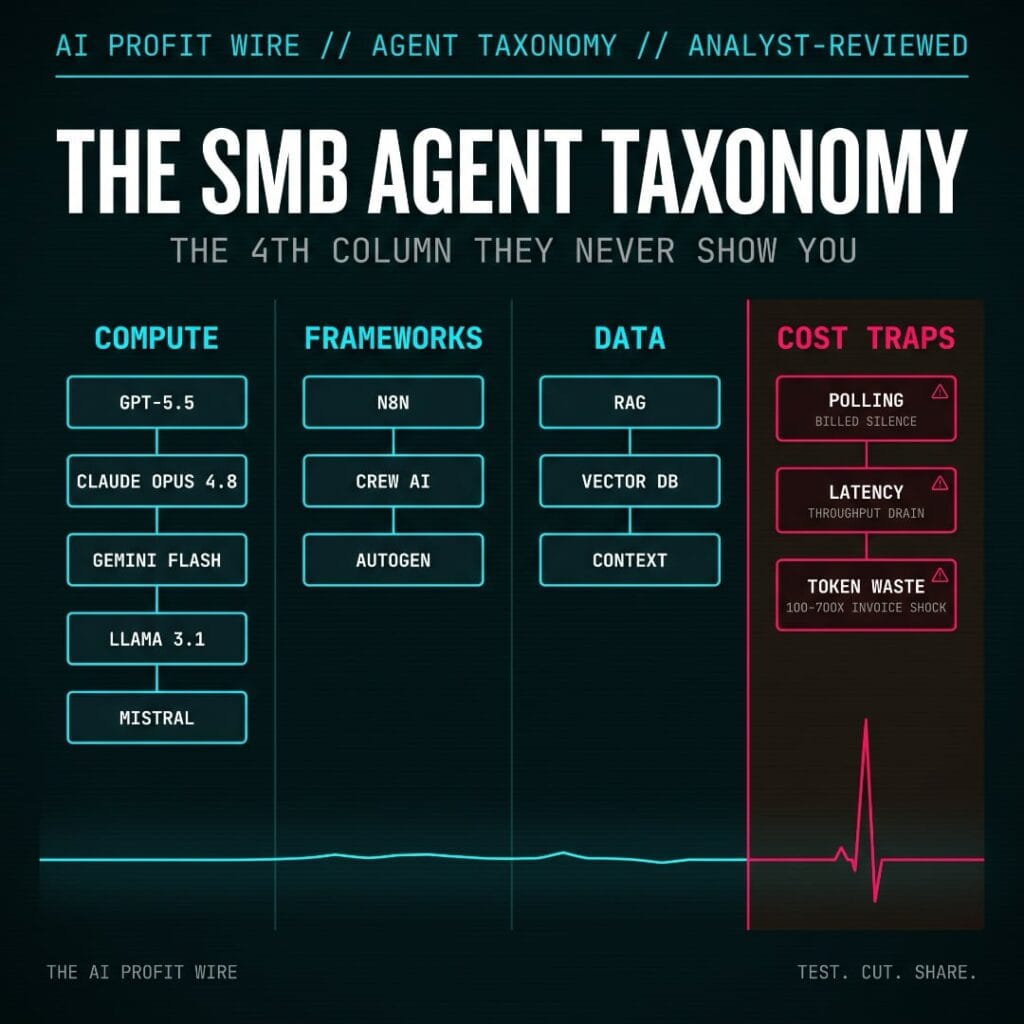
The SMB Agent Taxonomy is that map. Four columns. Verified costs. No vendor noise. This framework covers the exact data the AI Profit Wire intelligence pipeline has been tracking across the agent landscape throughout 2026. Below the cost traps, the agent access ladder answers how much each agent should be allowed to touch.
What is the SMB AI Agent Taxonomy and why does it matter for small businesses in 2026?
The SMB Agent Taxonomy maps four architectural layers every production AI agent requires: COMPUTE (the model that processes information), FRAMEWORKS (the logic that orchestrates the workflow), DATA (the memory that gives the agent domain-specific knowledge), and COST TRAPS (the billing patterns that eliminate margin before the project reaches its first renewal). Understanding all four columns at once is what separates a small business running a real production agent from one still running one-off tool experiments. Each column compounds the others: the model selected in COMPUTE sets the per-task cost floor, the framework determines whether that cost scales linearly or quadratically, the data layer determines the accuracy of agent decisions, and the cost traps either addressed or ignored determine whether any of the first three columns deliver any return at all.
Competitive content analysis across five target search queries shows coverage of cost traps running far behind coverage of compute choice on currently published articles. No existing published article unifies all four pillars into a single SMB-specific framework with verified cost benchmarks. This framework is the only current reference that maps all four architectural layers simultaneously with sourced cost data specific to small business workloads.
Which AI models should small business owners actually use in 2026?
The COMPUTE column covers five models spanning the full cost spectrum an SMB agent stack requires, from $5.00 per million input tokens at the premium reasoning tier to $0.40 per million tokens for high-volume repetitive workloads. GPT-5.5 (OpenAI) and Claude Opus 5 (Anthropic) lead the premium tier, each at $5.00 per million input tokens. GPT-5.5 outputs at $30.00 per million tokens across a 1M-token context window. Claude Opus 5 outputs at $25.00 per million tokens with a comparable context window, optimized for extended reasoning and safety-critical task handling. Both models deliver the reasoning quality required for high-stakes applications: legal document review, financial analysis, and complex multi-step decision processes where a wrong answer carries a measurable cost.
Gemini 3.5 Flash (Google) occupies the middle tier at $1.50 per million input tokens and $9.00 per million output tokens with a 1M-token context window. It delivers near-Pro reasoning capability and remains accessible on a free tier through Google AI Studio, making it the highest-value entry point for real-time or customer-facing tasks that do not require premium reasoning depth. Llama 3.1 70B (Meta) runs at up to $0.88 per million tokens on platforms including Together AI, with self-hosted deployment available at zero token cost through providers such as PikaPods, starting around $3.70 a month. Mistral Large 3 (Mistral AI) carries Apache 2.0 licensing at $0.50 per million input tokens and $1.50 per million output tokens, making it the most underestimated model in the SMB stack: near-frontier reasoning performance at roughly one-tenth the cost of GPT-5.5.
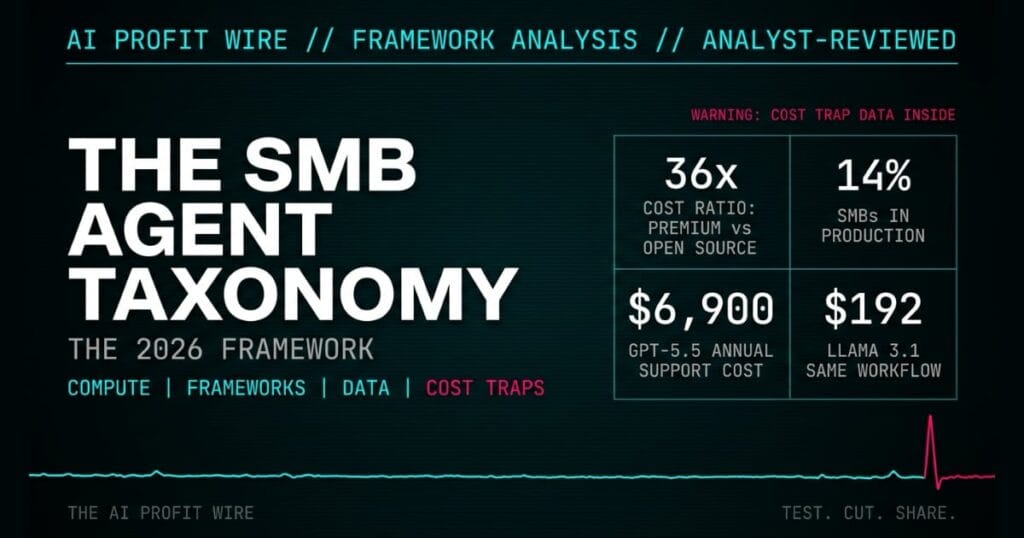
The cost difference between tiers is not marginal. Take a customer support workflow handling 50,000 monthly interactions at 500 input tokens and 200 output tokens per interaction, or 300 million input tokens and 120 million output tokens a year. On GPT-5.5 at $5 and $30 per million tokens, that runs about $5,100 a year. On Llama 3.1 70B at Together AI’s $0.88 per million tokens, the same volume runs about $369.60 a year. The dual-model strategy is the single most impactful cost decision in the entire taxonomy: routing high-stakes tasks exclusively to GPT-5.5 or Claude Opus 5 and high-volume repetitive tasks to Llama 3.1 or Mistral Large 3 can cut annual compute costs by well over 90 percent compared to running premium models across all workloads.
Which agent frameworks actually work at small business scale?
n8n is the strongest option for non-technical small business owners and technically ambitious small teams. The self-hosted Community Edition is free with unlimited executions, running on managed server infrastructure at $3 to $7 a month through services such as PikaPods. The Cloud Starter plan runs 20 EUR a month, billed annually, for 2,500 monthly executions. With more than 205,000 GitHub stars and over 12,400 community workflow templates, n8n has the most documented deployment ecosystem of any framework in this comparison, and the AI Profit Wire tracks agentic framework developments continuously in the daily signals archive.
CrewAI is the correct framework for small business teams that require multi-agent orchestration with hierarchical task execution and have technical development resources available. The open-source version carries an MIT license with unlimited agents and executions when self-hosted. On the hosted side, CrewAI’s Basic plan is free with 50 monthly executions included. The production warning that matters for small teams: multi-agent token multiplication is a real cost trap in CrewAI deployments, because chaining multiple agents multiplies API costs across the entire workflow and compounds the failure surface area, since an early agent’s failure can cascade the entire pipeline. The practical starting point is two to three agents maximum with per-agent reliability validated before scaling.
AutoGen is in maintenance mode as of early 2026 and should not be the starting point for any new production deployment: Microsoft consolidated AutoGen with Semantic Kernel into the Microsoft Agent Framework (MAF) v1.0, which reached general availability in April 2026, and AutoGen v0.5.7 now receives only security patches and bug fixes, not feature development. Teams with existing AutoGen deployments need a migration plan. New projects should evaluate MAF for Microsoft-ecosystem environments, and n8n or CrewAI for cross-platform flexibility.
How does the right data layer protect your agent’s accuracy without fine-tuning costs?
The DATA column resolves the most expensive misconception in SMB AI deployments: the assumption that fine-tuning is the path to a domain-specific agent. RAG (Retrieval Augmented Generation) is the default choice for small businesses in 2026, and the reason extends beyond cost. OpenAI deprecated self-serve fine-tuning access on May 7, 2026, with full shutdown for existing customers scheduled for January 6, 2027. The most accessible fine-tuning pathway in the market is no longer available to new customers, and the remaining providers require ML engineering expertise and specialized dataset preparation that most small teams do not have in-house. The AI Profit Wire’s intelligence methodology covers how these market shifts are evaluated and scored across the pipeline’s daily signal monitoring.
RAG setup and hosting costs vary by document volume and query frequency, but they scale with usage instead of requiring a new training run every time your knowledge base changes, which is the structural advantage over fine-tuning. Small business owners with significant content and SEO operations, for example those running workflows similar to what the NeuronWriter Intelligence Report covers, should note that their proprietary keyword research, content audits, and topic clusters represent exactly the kind of domain knowledge that belongs in a RAG vector store, delivering far more value than a base model working from generic training data. RAG is the structurally superior choice for any team that updates its business information more than once a year, because the knowledge base updates without a retraining bill.
Qdrant offers the strongest free cloud tier, with permanent access at 1GB RAM and 4GB disk, and managed plans starting at $25 a month, making it the correct starting point for most small businesses in the validation phase. Chroma is the lowest-cost self-hosted option at zero cost under an Apache 2.0 license. Pinecone provides the most accessible managed experience with no self-hosting requirement and a $50 a month minimum. Weaviate restructured to a $45 a month minimum in October 2025 with BSD-3 licensing and GraphQL-based hybrid search capability.
What are the three cost traps that eliminate AI agent margins before the first renewal?
The COST TRAPS column is the column vendor taxonomies never include, and it is the column that determines whether the investment in the first three columns produces any return at all. Small businesses that do not address polling, latency, and token waste before launch routinely see their production bill land well above their pilot estimate. Treat your pilot’s API cost as a floor, not a forecast, and build a buffer into the budget before you sign anything.
Polling is the most dangerous trap for new agent deployments because its cost structure is compounding, not linear. Most LLM APIs rebill the full conversation history on each call in a polling loop, so every iteration costs more than the last, and a loop left running unattended can burn through a budget fast. The fix requires no additional infrastructure: webhooks replace polling and invoke agents only when actual work occurs, which cuts the number of billed calls to a fraction of what a fixed polling interval generates.
Latency traps destroy production deployments in two forms. The first is model selection mismatch: a model running in extended reasoning or thinking mode can take many seconds longer to return a first token than the same model in standard mode, which rules it out for any real-time or customer-facing application. The second form is that published latency benchmarks are typically median figures, and production latency at the high end routinely runs well above the marketing number, so budget for the slow case, not the average case. Dynamic model routing, directing customer-facing traffic to faster models and batch tasks to cost-efficient models, is the standard fix for keeping latency budgets intact while controlling cost.
Token waste is the most pervasive trap and carries the highest-leverage fix. A naive agent loop that re-sends its full context and system prompt on every step accumulates cost quadratically instead of linearly, and a RAG system that over-retrieves can burn a large share of the token budget on formatting and boilerplate instead of the answer. Prompt caching is the highest-ROI fix in the entire cost trap column: it requires zero additional infrastructure, costs nothing to implement beyond a configuration change, and delivers real savings. Anthropic documents up to 90 percent savings on cache hits, OpenAI documents a 50 percent cost reduction on cached tokens, and ProjectDiscovery’s published production case study confirms a 59 percent savings in a named deployment.
The Margin Obsession
Running four businesses simultaneously means the invoices from one operation always reveal the pattern the others are about to repeat. The current AI billing data reads the same way a restaurant food cost report reads when a new dish was added without running the yield test first: the revenue line looks healthy, the margin line tells a different story, and the gap lives somewhere between the demo and the production deployment. Most small business owners treat the COST TRAPS column as fine print. The businesses running production AI agents at sustainable margins build for Column 4 first: they set the polling boundaries before writing the first webhook, configure prompt caching before optimizing for accuracy, and price the token waste ceiling before signing any API contract. The four columns of this taxonomy do not have equal weight. Column 4 determines whether the other three are worth building at all.
How much access should an AI agent get in a small business?
Give an AI agent the lowest rung that still finishes the job, and set that rung through the permissions on the agent’s own account, not through its instructions. A prompt is not a security boundary: an agent told never to send can still send if its account is allowed to.
We use a four-rung ladder for this. It is Metadata Marketer’s own framework for small teams, not an industry standard. Each rung adds one kind of power: reading, drafting, acting once a person approves, and acting alone.
| Rung | What the agent can do | Store example | Clinic example | Bookkeeper example | What keeps it on the rung |
|---|---|---|---|---|---|
| 1. Read | Looks at records and documents, changes nothing | Reads order history to answer where an order is | Reads open slots in the booking calendar | Reads bank feeds and unpaid invoices | A read-only login or API key |
| 2. Draft | Prepares work for a person to send or save | Drafts the reply to a delayed-order email | Drafts a reminder for staff to send | Drafts journal entries for review | No send, publish or save rights; drafts land in a folder |
| 3. Act with approval | Carries out the action after a person says yes | Issues a refund once staff approve it | Books an appointment after the front desk confirms | Pays a bill after the owner approves | An approval step in the workflow before the action |
| 4. Act alone | Carries out the action with no person in the loop | Tags orders and updates internal stock notes | Sorts the staff inbox and files internal notes | Matches bank lines to invoices, which it can unmatch | Only internal, easy-to-undo jobs, with a log someone reads |
Most small business agents belong on the first two rungs at launch. The same line separates a chatbot that answers questions from one that takes actions, which our guide to AI chatbots and design tools for small business covers tool by tool.
One owner reported access creeping up one sensible step at a time: read-only data, then an API, then email, until the agent could change records or contact customers. Write each agent’s rung down when you set it up, and check it again every time you add a connection.
The rung lives in the account’s permissions. If the login can send, the agent can send, whatever the prompt says.
Which AI agent jobs can run without approval?
At launch, only jobs that stay inside the business and are easy to undo, such as tagging, sorting and internal notes. Anything that sends, pays, books or changes a customer record waits for a person until weeks of logs show the agent gets it right.
Owners report a second problem once approvals are in place: after a few dozen prompts, people click yes without reading. So ask for fewer, bigger approvals. Batch the low-risk items into one daily review, and keep single approvals for money and for messages to customers.
Our guide to n8n workflow gates shows where an approval step sits in a workflow and how the run waits for a person.
One owner described an order desk where most of the work needed nothing smart, and the person’s day went on the exceptions. That is the split to aim for: the agent handles the routine work on its rung, and a person handles what falls off it.
Approve fewer things, and read every approval that moves money or reaches a customer.
What happens when an AI agent reports a job done that actually failed?
Treat done as a claim to check. One owner reported an agent confirming a booking when the calendar write had failed. Build the workflow to read the result back, for example by opening the calendar and finding the booking, before it tells anyone the job is finished.
Every outward action should end in one of three states: done, not done, or unknown. Done means the read-back found it. Not done means the system refused it. Unknown, such as a timeout, goes to a person instead of the next step.
Never retry a send blindly after a timeout. One owner reported that a timed-out send may already have gone through, so a blind retry creates a duplicate. Check whether it arrived, then retry.
If you build in n8n, look at the Retry On Fail setting on each step. n8n’s node docs describe it this way: “When an execution fails, the node reruns until it succeeds” (read Nov 2, 2026). On a step that sends or books, leave it off.
Send failures to an error workflow instead. n8n’s workflow settings let you “Select a workflow to trigger if the current workflow fails” (read Nov 2, 2026). That workflow can alert a person when a result is unknown.
For a clinic, the read-back is the difference between a confirmed booking and a patient who arrives to no appointment. Our guide to AI receptionists for small business covers the front-desk version. If patient details are involved, check your own obligations and the tool’s data terms before you connect it.
Done, not done, or unknown. An agent that cannot tell the three apart should not be acting alone.
How do you stop an AI agent loop from running up the bill overnight?
Put three limits in place before launch: a hard spend limit at the model provider, a time limit on the workflow, and a cost log per workflow that someone reads. A small team reported a retry loop that ran up a large bill overnight, and each of these limits is there to stop or show that.
Anthropic’s rate limits page says you can “set your own spend limit below your tier’s cap to control costs” (read Nov 2, 2026). The setting is on the Billing page of the Claude Console. Limits can also be set per workspace, but the same page says “You can’t set spend limits on the default Workspace,” so give agents a workspace of their own.
OpenAI’s production best practices guide puts it plainly: “To enforce a monthly cap, set a hard spend limit” (read Nov 2, 2026). It also describes spend alerts on the limits page and “custom rate and spend limits per project.” A hard limit stops the API traffic once it is reached, so a capped agent stops until you raise it.
In n8n, the Timeout Workflow setting cancels “the current workflow execution after a certain amount of time elapses,” as n8n’s settings docs put it (read Nov 2, 2026). With it on, a stuck loop ends at the time you set instead of running until morning.
Then log cost per workflow, so a loop shows up as one line that jumped, not as a bigger invoice at month end. Our guide to LLM cost tracking per workflow shows how to set that up.
A spend limit, a timeout and a cost log you read. Set all three before an agent runs unattended.
AI agent access: questions small business owners ask
Do I still need to read every approval prompt?
Read every one that sends, pays or touches a customer. For the rest, ask for fewer, bigger approvals: batch the low-risk items into one daily review, so the prompts that matter still get read.
Should an AI agent have its own login?
Yes. Give each agent its own account set to its rung, never a shared staff login. Then the logs show what the agent did, and you can cut its access without locking out a person.
Is read-only access safe?
Safer, not safe. An agent that only reads still passes what it reads to the AI tool, so check the tool’s data terms before you connect customer records, even on the first rung.
How should a small business owner sequence their AI agent stack build in 2026?
The taxonomy is not built left to right. The correct sequence for a small business building its first production agent stack reverses the order in which most vendors present the decision. Start with COST TRAPS: document the polling risk, set the monthly API budget ceiling, and configure prompt caching as the baseline configuration before any model is selected. These decisions cost nothing and prevent the overruns that a launch without them tends to produce. Then address DATA: determine what domain-specific knowledge the agent requires, implement RAG using Qdrant’s permanent free tier as the vector store, and populate it with business documents before connecting any model. An agent with accurate retrieval performs better across every model tier.
Then select FRAMEWORKS: n8n self-hosted for most small business teams, CrewAI for those with technical resources and multi-agent requirements, and MAF for Microsoft-ecosystem organizations. Do not start new projects on AutoGen. Then select COMPUTE models using the dual-model strategy from the beginning: Gemini 3.5 Flash or Mistral Large 3 for high-volume tasks, GPT-5.5 or Claude Opus 5 reserved for the tasks where a wrong answer carries a measurable cost. Small business owners who have already validated full-funnel automation, for example those running all-in-one platforms such as those covered in the Systeme.io Intelligence Report, are well-positioned to layer RAG-powered agents directly on top of their existing workflow and contact data without rebuilding the operational foundation. Before any agent goes live, set its rung on the access ladder above.
Most of the 76 percent of small business owners already using AI tools have not yet made the jump into a running production agent, and that is not a capability gap, it is a sequencing and cost architecture gap. Each column of this taxonomy closes a specific part of it by making the hidden costs visible before the first invoice rewrites the budget.
Get the weekly intelligence briefing that covers the tools, pricing shifts, and billing warnings that move these numbers: subscribe to The AI Profit Wire.
Test. Cut. Share.
Last Updated: November 2nd, 2026 | Content Type: Category Framework Analysis | Analyst: Moe Sbaiti
