Saves time during proposal and report drafting by eliminating the need to switch tabs between research and writing.
What Is Gemini Notebook Context in Google Docs?
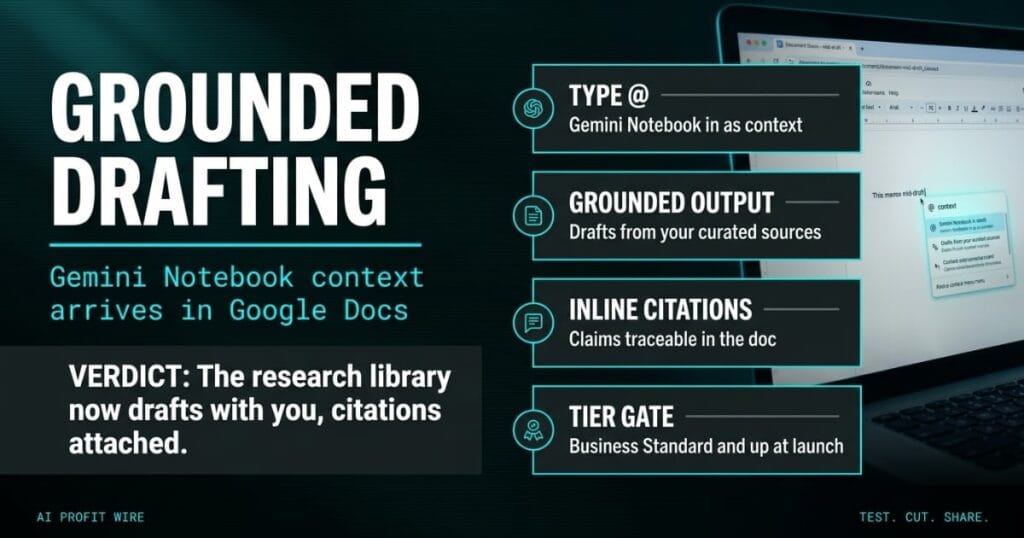
Google Docs can now pull an existing Gemini Notebook into a draft as a live context source. The Workspace Updates announcement frames it as bridging deep research and content creation: type @ in the Docs side panel or bottom bar, reference the notebook, and Gemini grounds its output in the sources you curated.
The grounded draft arrives with inline citations, so each claim traces back to a source without leaving the document. Google names 2 document types as the target use case: project proposals and technical whitepapers.
The research library now drafts alongside you inside the document, with the citations attached.
Does Gemini in Google Docs Cite Its Sources?
Yes, and that’s the mechanism the whole feature rests on. The announcement states Gemini grounds its output in your notebook sources and provides inline citations so facts can be verified mid-draft, without breaking flow.
What Google did not publish is any accuracy figure or benchmark for the grounding quality. The citations are the verification layer Google offers, and the source hygiene inside the notebook is the verification layer you own.
End users also need Workspace smart features enabled before the @ trigger appears, and admins manage that setting per org. The rollout notes name no separate license, which places the whole cost side on the plans teams already carry.
Access is narrower than most Workspace rollouts: the feature lists Business Standard and Plus, Enterprise Standard and Plus, Education Plus, and consumer Google AI Pro and Ultra. The Workspace release tracker shows it went live for both Rapid Release and Scheduled Release domains on day 1.
Inline citations are real and shipped, but Google published no error rate to lean on.
How Is Gemini Notebook Drafting Different From Copy-Paste?
The old workflow moved research by hand: copy excerpts into a chat window, paste the answer back, then re-check every claim against the original file. The new workflow keeps the notebook attached inside the document, so grounding happens where the writing happens.
The trade is curation discipline. A grounded model treats every source in the notebook as equally valid, so a 1-year-old pricing sheet gets cited with the same confidence as a current one.
That shifts the quality control upstream: the notebook review becomes the editing pass, and the draft becomes the output you check instead of the research you assemble.
Google documents the data handling for Gemini features across Docs in its Workspace help center, which matters for teams drafting client-facing material.
You stop paying the copy-paste tax per draft and start paying a smaller tax on notebook hygiene.
Who Is Gemini Notebook in Google Docs For?
The feature aims at teams that write long, source-heavy documents inside Google Workspace, with proposals and whitepapers as the named examples. Admin controls ship alongside it, so deployment can be managed per org.
End users need Workspace smart features enabled, and admins need Gemini for Workspace in Drive turned on before anyone sees the option. That makes the rollout a deliberate deployment rather than a feature that arrives uninvited.
If your output is proposals, whitepapers, or research-backed reports, the AI chatbot and design tool roundup for small business covers what else in this category earns its seat. The practical test is simpler: does the team already trust the notebook enough to let it draft.
Research-heavy writing teams already paying for the right Workspace tier are the exact target.
The proposal deadline is tomorrow morning, and the research lives in a notebook your analyst built 3 weeks ago. Under the old workflow, tonight means 40 open tabs, a chat window, and pasting the same pricing numbers back and forth until midnight.
The citations at the bottom of the finished draft were the part you re-checked last, at the hour when mistakes slip through. The work shifts from shuttling research to curating it, which is the part a senior hire should own anyway.
Stale source in, confidently cited draft out: that’s the new failure mode, and it costs 10 minutes of notebook review to prevent.
What Should You Do About Gemini Notebook in Docs Now?
Check your Workspace tier first, because Business Starter and Education Standard sit outside the launch list. If the tier qualifies, build 1 notebook for the document your team rewrites most and keep it to current, verified sources.
Retire anything in the notebook you wouldn’t cite by hand, because the model cites whatever it finds with equal confidence. The maintenance habit is what separates grounded drafting from confidently wrong drafting.
Time the next grounded draft against the last one written the old way, since Google published no benchmark that promises the gain for you. The cost is the curation time, and the feature itself ships inside plans you already pay for.
Build 1 clean notebook this week and let the draft timer deliver the verdict.
Source: Google Workspace Updates
