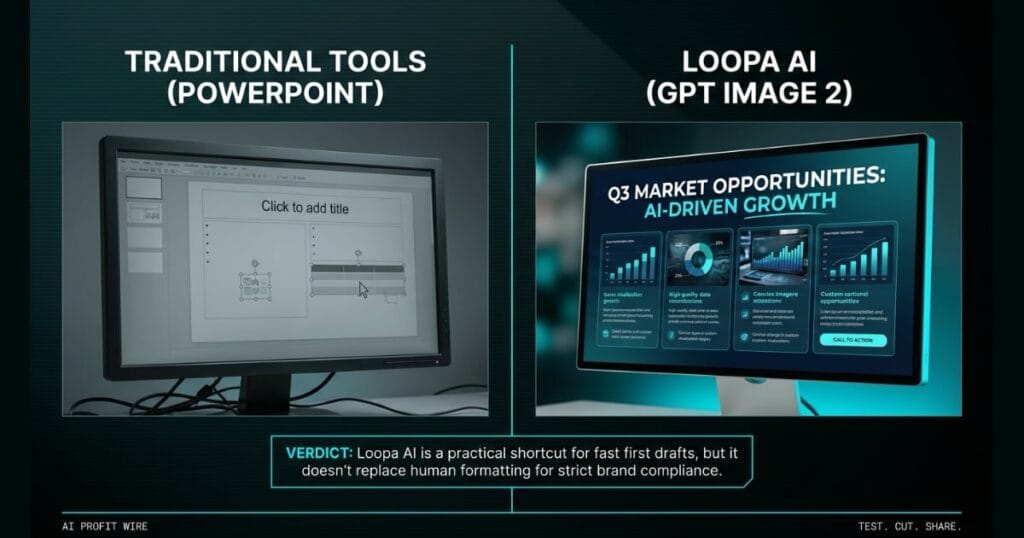
Saves small businesses time and design costs by instantly converting raw notes and reports into polished, client-ready presentations.
What’s Loopa AI GPT Image 2 Slides Maker and what changed?
Loopa AI is an AI agent workspace that plans and executes multi-step tasks using GPT Image 2 to generate fully designed presentations. The slide maker turns raw documents or prompts into image-based slides instead of relying on basic bullet-point templates.
The core change is that the model handles text rendering, layout, and composition in a single generated image per slide. This approach fixes a persistent weak point in older AI image generators that made them impractical for text-heavy presentations.
Users can feed the system a PDF, a set of notes, or a written prompt describing a topic, and the agent extracts the key structure automatically. It outputs a deck with a consistent color palette, readable typography, and contextually relevant imagery.
Loopa AI shifts the starting point from a blank canvas to a visually polished first draft.
What’s the evidence behind Loopa AI GPT Image 2 Slides Maker?
The platform runs on a freemium model with a free tier available and no credit card required to start. Paid plans unlock higher usage limits and faster processing for users who need greater generation volume.
Loopa runs GPT, Claude, Gemini, and DeepSeek alongside GPT Image 2 in the same environment. This allows research and drafting to happen before the slide stage without exporting content between separate applications.
The source notes that GPT Image 2 provides improved text-in-image accuracy compared to older generators. Exact tier pricing isn’t published as a flat rate, as the platform adjusts credit allowances by plan rather than locking features behind hard paywalls.
The evidence points to a production-ready tool with a free tier for immediate testing.
How does Loopa AI GPT Image 2 Slides Maker compare to the alternatives, and what background do small business owners need?
Most AI presentation generators fall into two buckets: tools that write an outline for a template to handle, or tools that generate individual images and leave deck-assembly to the user. Loopa tries to close this gap by using an image model that lays out text and visuals together.
PowerPoint offers pixel-level authority over every element, which makes it the default for precise formatting and guaranteed client compatibility. Loopa flips this by prioritizing speed and a stronger starting aesthetic over manual control.
The tradeoff is that Loopa is stronger with narrative content than with dense financial models or spreadsheet-heavy slides. In practice, many users generate the first draft with Loopa and export to PowerPoint or Google Slides for final polish.
Loopa provides a faster starting point, but traditional tools still win for pixel-perfect brand compliance.
How does Loopa AI GPT Image 2 Slides Maker affect day-to-day operations for small businesses?
For small business owners, the tool saves time and design costs by instantly converting raw notes into client-ready presentations. This is particularly useful for small teams without a dedicated designer on staff.
Founders and consultants can build pitch decks directly from research tasks without switching tools. Individual slides can also be reviewed and regenerated on their own, which saves time and credits compared to a full re-run.
If a company has an exact color, font, and logo-placement spec, expect to do some manual cleanup after export. The platform is built for generating a presentable deck fast rather than achieving pixel-perfect brand compliance on the first pass.
Day-to-day operations benefit from faster first drafts, but final formatting still requires a human touch.
A client emails at 4:45pm asking for a deck summarizing last quarter’s service performance, and the meeting is tomorrow at 9am. The data lives in scattered spreadsheets and call notes, and building a slide from scratch means 2 hours of formatting nobody on your 3-person team has.
You paste the raw notes into Loopa’s workspace and let GPT Image 2 generate each slide as a single designed visual. In under 60 seconds, you have a 10-slide deck with readable typography and a consistent color palette. It isn’t pixel-perfect to your brand guide, but the structure and data are solid.
You spend 15 minutes swapping the logo and fixing 2 color values, then send it off. The 2-hour grind became a 15-minute polish, and you didn’t miss dinner with your family.
What’s the final verdict on Loopa AI GPT Image 2 Slides Maker?
Loopa AI isn’t trying to be a full design suite replacement for teams with strict brand systems. It targets the common problem of getting from raw content to a presentable deck fast without the layout grind.
For freelancers, students, and small teams who need a strong first draft, it’s a useful shortcut inside a broader AI agent workspace. The free tier makes it easy to test how far credits stretch before committing to a paid plan.
Dense financial data still benefits from human formatting, and exact logo placement requires manual cleanup. The tool is best suited for people who want a finished-looking deck without opening PowerPoint from a blank page every time.
Loopa AI is a practical shortcut for fast first drafts, but it doesn’t replace human formatting for strict brand compliance.
Source: AutoGPT Blog
