Saves time by automatically preserving critical visual context from meetings, reducing the need for manual screenshot taking and note compilation.
What is Google Meet Visual Screenshots and what changed?
Google Meet will soon automatically capture visual screenshots of presented slides and charts directly into its AI-generated meeting notes. This update integrates visual context into text summaries without requiring manual intervention.
The rollout starts in the coming weeks for the ‘Take notes for me’ feature. It automatically captures presented content, including slides, diagrams, and charts, directly into the generated meeting notes document.
This ensures critical visual context is preserved alongside spoken summaries and transcripts. Small business owners no longer need to manually take screenshots during presentations to keep a record of visual data.
Google Meet now embeds visual context directly into AI-generated meeting documentation.
What is the evidence behind Google Meet Visual Screenshots?
The evidence comes directly from the official Google Workspace Updates blog, which announced the pre-launch phase for administrators. Admins can currently decide whether visual screenshots of presented content are allowed in meeting notes.
Administrators can pre-configure their preferred settings in advance of the general availability rollout. This pre-configuration prevents workflow disruption when the feature goes live for all users.
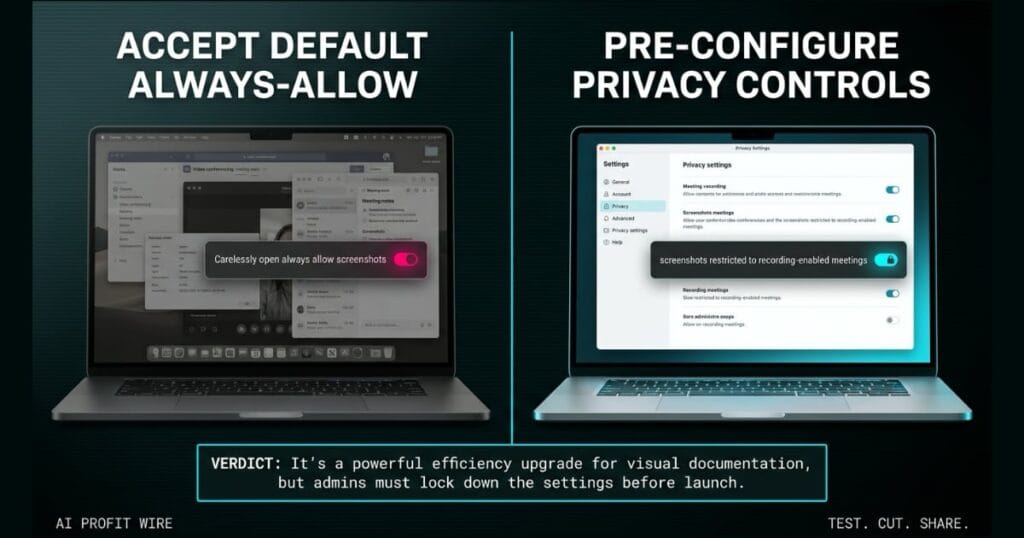
The admin controls can be configured to always allow screenshots of presented content, which is the default state. Alternatively, admins can restrict the feature to only allow screenshots when a meeting recording is enabled.
Administrators have the controls to dictate exactly how visual data is captured and stored before the rollout hits.
How does Google Meet Visual Screenshots compare to the alternatives, and what background do small business owners need?
Unlike manual screenshot tools or third-party screen recorders, this feature embeds visual captures directly into the AI-generated notes document. This native integration eliminates the friction of switching between applications during a live call.
Google Meet integrates this directly into the existing ‘Take notes for me’ workflow.
The tradeoff is that admins must actively choose between the default always-allow setting and the restricted recording-only mode. Failing to pre-configure these settings means accepting the default, which might not align with strict privacy policies.
Native integration beats third-party workarounds, but only if admins actively manage the privacy controls beforehand.
How does Google Meet Visual Screenshots affect day-to-day operations for small businesses?
For small business owners, this feature directly reduces the time spent compiling meeting recaps and tracking down presentation slides. The AI handles the visual documentation automatically, freeing up attention for the actual conversation.
Teams can rely on a single, comprehensive document that holds both the transcript and the exact charts referenced. You can explore more strategies to optimize your workflow and track other AI rollouts impacting small businesses to stay ahead.
However, if your business handles sensitive client data, the default setting to always allow screenshots could create compliance risks. Admins must evaluate whether unrestricted visual capture fits their operational security requirements before the rollout lands.
Automated visual documentation saves time, but requires immediate admin oversight to prevent data overexposure.
A junior stylist flags down the salon manager mid-foil, unaware that the new AI booking system has been silently capturing photos of every color formula chart pinned to the styling station. The system pulls those visual captures directly into the automated appointment log, mirroring how Google Meet now embeds presented slides into its AI-generated notes.
The friction hits when the client asks why her hair formula photos are sitting in the plain text appointment record. The manager realizes the default was left on always allow, automatically grabbing every chart without explicit permission, the same default Google Meet ships with unless admins pre-configure now.
The takeaway for any founder: when you plug a visual capture tool into an automated log, pre-configure the boundaries before the rollout hits the floor. You can’t accept the default always-allow setting without understanding exactly what visual data is being archived alongside your text.
What is the final verdict on Google Meet Visual Screenshots?
Google Meet Visual Screenshots is a major time-saver for teams that rely on visual data in their meetings. It eliminates manual capture and keeps notes comprehensive.
The feature automatically pulls slides, diagrams, and charts into the ‘Take notes for me’ document. This consolidation reduces the operational friction of managing multiple tools during a presentation.
However, the default always-allow setting requires immediate admin attention. Small business owners must pre-configure the controls to match their privacy standards before the rollout.
It’s a powerful efficiency upgrade for visual documentation, but admins must lock down the settings before launch.
Source: workspaceupdates.googleblog.com
