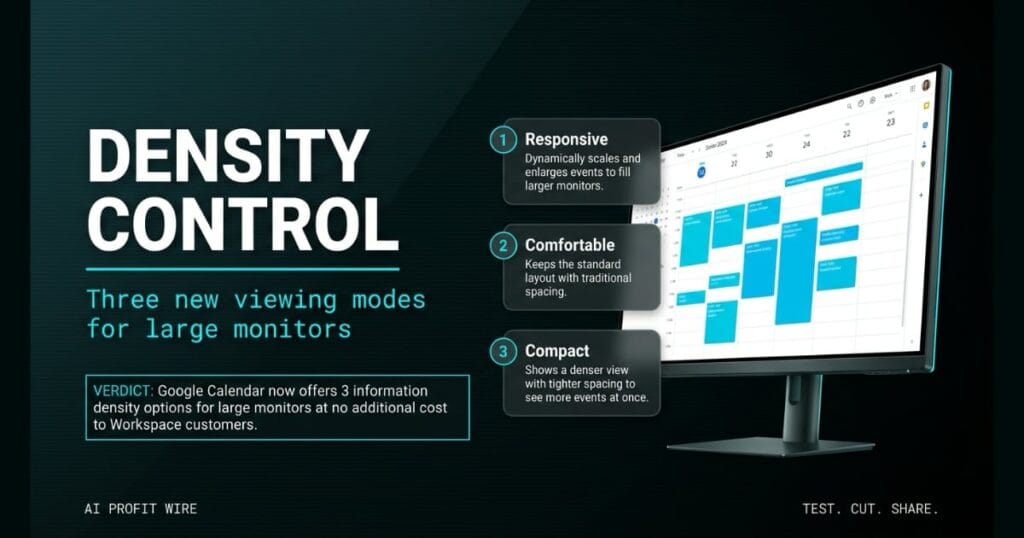
This update improves daily scheduling efficiency by allowing users to view more appointments simultaneously or read them more easily on larger screens.
What is Google Calendar density options and what changed?
Google Calendar updated its information density options for the calendar grid. These updates allow users to customize how calendar events scale on various monitor sizes.
The platform now includes 3 specific viewing modes. Users can choose Responsive, Comfortable, or Compact options to adjust their screen layout.
Responsive dynamically scales and enlarges events to fill larger monitors. Comfortable keeps the standard layout with traditional spacing, while Compact shows a denser view with tighter spacing.
The update gives users control over their calendar viewing experience on large monitors.
What is the evidence behind Google Calendar density options?
The evidence comes from an official announcement by Google on the Workspace Updates blog, dated July 29, 2026. The update includes documentation for admins and end users.
Google Workspace announced these 3 information density options: Responsive, Comfortable, and Compact. Each mode addresses a specific viewing preference on large monitors.
The end user instructions specify changing density settings from the Appearance settings menu in Calendar on the web. The rollout pace is an extended rollout that started on July 29, 2026.
The announcement confirms there is no admin control for this feature, which means end users can toggle between the 3 modes without waiting on IT. The rollout applies to all Google Workspace customers, Workspace Individual subscribers, and personal account users across both rapid release and scheduled release domains.
The evidence confirms an official launch with admin and end user documentation.
How does Google Calendar density options compare to the alternatives, and what background do small business owners need?
Google Calendar provides these 3 density options within its existing ecosystem, available to all Google Workspace customers, Workspace Individual subscribers, and personal account users.
The Responsive mode enlarges events to fill larger monitors, which makes events easier to read from a distance. The Comfortable mode keeps the standard layout with traditional spacing regardless of screen size.
The Compact mode shows a denser view with tighter spacing, which allows you to see more events at once on the same screen. The 3 modes cover the operational spectrum from readability to density.
The rapid release rollout started on July 29, 2026, with the scheduled release following on August 10, 2026. End users change density settings from the Appearance settings menu in Calendar on the web, with no admin control required.
Google Calendar now offers large monitor scaling within its existing ecosystem at no additional cost.
How does Google Calendar density options affect day-to-day operations for small businesses?
This update allows users to view more appointments simultaneously on large monitors. Small business owners can read schedules more easily across the room.
The Compact view tightens spacing to fit more events on one screen. The Responsive view enlarges those event blocks for easy reading from a desk.
Founders can adjust density from the Appearance settings menu in Calendar on the web. The 3 modes let you toggle between density and readability without leaving the platform.
Service businesses with 5 to 10 daily appointments no longer need a dedicated dispatch platform to manage the calendar grid. The 3 modes give founders control over how the schedule renders on the monitor they already own.
The update allows users to customize how events scale on their screens for the first time.
The 8 AM rush at the auto repair shop hits with 6 cars queued for service and 3 more scheduled for tire rotations before noon. The shop manager’s 27-inch monitor runs Google Calendar in the default Comfortable view, which shows 5 service bays at a time before forcing a scroll. The 6th car, the alignment job that pays the labor margin for the day, is hidden below the fold.
Google Calendar’s 3 density options fix this exact friction. The Compact view tightens the spacing and fits all 9 appointments on one screen without scrolling, which means the alignment job is visible at 8 AM instead of discovered at 11 AM. The Responsive view enlarges those 9 event blocks so the shop manager can read customer names from the parts counter instead of walking up to the wall monitor.
The 3 modes are the operational lever. Founders running 5 to 10 daily appointments on a single monitor do not need a dispatch platform, they need a calendar grid that uses the screen space they already own.
What is the final verdict on Google Calendar density options?
Google Calendar now offers 3 specific information density options for large monitors. It is an interface upgrade for small business owners managing complex schedules.
The Responsive, Comfortable, and Compact modes address specific operational needs. The update allows users to customize how events scale on their screens for the first time.
The feature is available to all Google Workspace customers, Workspace Individual subscribers, and personal account users at no additional cost.
It is a practical update that gives small business owners control over their scheduling visibility without buying a dispatch platform.
Source: workspaceupdates.googleblog.com
