Best AI Chatbot and Design Tools for Small Business (2026) Intelligence Report
In This Report
A 1-person online store runs into 2 unrelated bottlenecks as it grows: customers who need answers in the chat widget, and product visuals, social graphics, and merch designs that need to get made. Tidio prices the support job by conversation volume, and Kittl prices the design job per seat, so this roundup prices each tool for its own half of that workload, not as competitors, and ranks them on what you get for the money. Prices were checked on each vendor’s pricing page in October 2026 and each tool is scored with our Hype Check methodology.
| Tool | Cheapest fitting setup | What it does | Hype Score |
|---|---|---|---|
| Tidio | $68/mo (Starter $29 + Lyro AI Agent add-on $39) | Live chat, AI chatbot, proactive automations | 5.9/10 |
| Kittl | $15/mo (Pro, per editor) | AI design generation, typography, merch mockups | 6.4/10 |
What does it actually cost to run AI customer chat for a small online store?
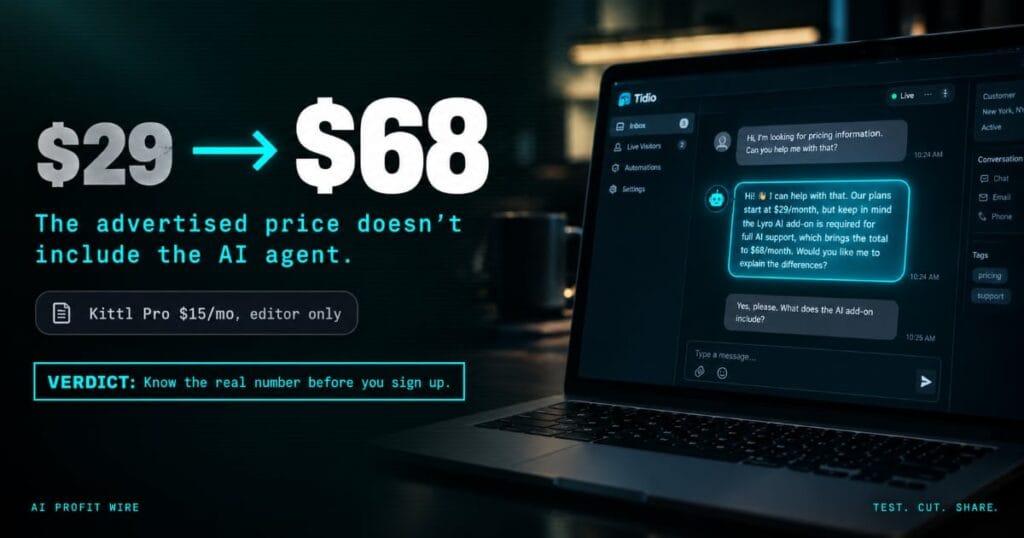
For a store handling 100 human-replied conversations and 50 AI-agent conversations a month, Tidio’s real monthly bill is $68, not the $29 the entry plan advertises.
Tidio’s Starter plan is $29 a month on monthly billing and covers 100 billable conversations. But Starter’s 50 Lyro AI conversations are a 1-time allotment, not a monthly-refreshing quota, so a store that needs 50 AI-agent conversations every month has to add the Lyro AI Agent add-on at $39 a month. Tidio’s own live pricing calculator confirms the total: Starter $29 plus Lyro AI Agent $39 plus Flows (proactive automation) at $0 for 100 visitors, for $68 a month total.
The advertised $29 entry price only covers human-replied chat. Recurring monthly AI-agent conversations push the real bill to $68, and that’s the number to budget against, not the sticker.
For the full 5-dimension Hype Check analysis, see the Tidio Intelligence Report.
What does it cost to produce 40 design assets a month with AI?
For a solo seller producing about 40 product visuals, social graphics, and merch designs a month, Kittl’s Pro plan at $15 a month per editor comfortably covers it.
Kittl’s pricing page lists Pro at $15 a month per editor with 2,000 AI tokens, up to 90 premium images, unlimited basic images, unlimited projects, high-resolution exports, and a commercial license covering up to 500,000 copies. A 40-image-a-month workload sits comfortably under Pro’s 90-premium-image allowance. The Free plan is personal-use only and carries no commercial license, so it doesn’t fit a business that’s actually selling what it designs.
Kittl Pro covers a 40-design-a-month workload with room to spare, and the commercial license is the detail that actually matters for a store selling merch and product graphics.
For the full 5-dimension Hype Check analysis, including the refund policy and how Kittl’s daily AI tokens work, see the Kittl Intelligence Report.
What do independent reviewers say about Tidio and Kittl?
Reviewers back both tools for the specific job each one is built for, not as a shared category.
TechRadar’s Tidio review says its “self-learning AI response bot sets it apart from similar competitors,” and Tooltester awarded it a Best Live Chat Tool for Ease of Use badge. A small-store owner on Reddit put a number on it directly: “The AI agent alone has probably saved us 15-20 hours a week on basic questions.” On the design side, Style Factory says Kittl is “better for working with typography and applying complex text effects” than Canva, and ecomm.design credits its “AI tools, mockup integration, and typography-focused editor” with giving it “a competitive edge in creative workflows.”
Independent reviewers back Tidio specifically for AI-handled customer chat and Kittl specifically for typography-heavy design production, and neither tool is trying to cross over into the other’s job.
Which support jobs can a small store hand to an AI chatbot?
Hand it the questions you already answer the same way every time, and let it take actions only when it’s connected to your store and you’ve chosen which actions it may take.
A store owner on r/ecommerce put the line well: there’s a big gap between a bot that explains your return policy and one that actually starts the return. A thread on r/AI_Agents draws the same line between automating a reply and automating a resolution. A support lead there says the small, repeat questions eat the time the hard cases need.
| Job | Examples | Who handles it |
|---|---|---|
| Answers | Hours, shipping times, return window, sizing, where to find a policy | The bot, from your own written pages |
| Actions | Order status, starting a return, changing an address before the order ships | The bot, only when it’s connected to your store and the action is switched on |
| Judgment calls | Refund exceptions, damaged goods, an angry customer, anything outside your policy | A person |
Start with answers, add actions one at a time once the answers are right, and keep every exception with a person.
Can Tidio’s Lyro start a return or check an order, or only answer?
It can do both, but the actions cost more than the chat setup in the table above.
Tidio’s Lyro Actions page lists real-time order status checks, changing delivery details on unfulfilled orders, starting the return process with a return label, triggering refunds, and checking stock. Tidio says you choose which actions Lyro may take.
The cost is on Tidio’s pricing page. Your first Action is free, and full access needs a paid Lyro plan, which starts at $39 a month for 50 conversations on monthly billing. “Native Shopify actions” are listed on the Growth plan and up, not on Free or Starter, and Growth starts at $59 a month on monthly billing. A Shopify store that wants Lyro to touch orders is looking at about $98 a month, against $68 for the answers-only setup we priced above.
Tidio scores 5.9/10 on our Hype Check. See the Tidio Intelligence Report for the full breakdown, or try Tidio (affiliate link; the score is unaffected). Tidio prices and Lyro actions checked October 27, 2026.
Switch on order status first, add returns once you’ve read a few weeks of transcripts, and leave refunds off until the rules below are in place.
How do you stop a chatbot from promising a refund you don’t offer?
Give it your real policy as its only source, tell it to hand every refund exception to a person, and test it with the awkward questions before customers do.
The case owners cite is Moffatt v. Air Canada, 2024 BCCRT 149, decided on February 14, 2024 by British Columbia’s Civil Resolution Tribunal, a small-claims body. Air Canada’s chatbot told a customer they could claim a bereavement fare after travelling, while another page on the same site said otherwise. The tribunal rejected Air Canada’s argument that it wasn’t liable for its chatbot, saying the company is responsible for all the information on its website, and it ordered Air Canada to pay $812.02 (Canadian), including $650.88 in damages.
The tribunal also said a customer shouldn’t have to double-check one part of a website against another. That is the lesson for a small store: if your bot says it, treat it as you saying it.
- 1. One source. Point the bot at your current refund and return policy page, and remove old versions from its knowledge base.
- 2. One rule. For any refund outside that policy, the bot quotes the policy and hands the chat to a person. It never agrees to an exception.
- 3. Ten test questions. Before launch and every month, ask it things like “can I get a refund after 60 days?” and “my item arrived late, can I get my money back?” and read every answer.
- 4. Weekly transcripts. Read a sample each week, and fix the source page when the bot gets something wrong.
- 5. Refund actions last. Don’t let it trigger refunds until steps 1 to 4 have run clean for a few weeks.
The same rules apply on the phone. Our AI receptionist guide covers what breaks when an AI answers your calls, including wrong details saved.
This is a summary of 1 small-claims decision in 1 Canadian province, not legal advice.
Your chatbot speaks for your business, so it should only repeat what your policy page says and pass everything else to a person.
When is a phone answering service a better buy than chat?
When your own numbers say most customers call instead of typing. For 2 weeks, count the calls you get (and the ones you miss) next to the chats and contact forms. A chat widget can’t help someone who never opens your website, so if calls win, the phone is where to start. Our AI receptionist guide compares what 6 phone answering services cost and where each one breaks. If the counts are close, start with whichever channel you miss more often today.
What is the move on your support-and-design stack today?
I ran restaurants for 16 years, and running a store without both of these is like running a dining room with nobody answering the phone and no menu board out front. Customers who message and get silence walk away, and a listing with no real visual doesn’t get clicked in the first place.
$68 a month for Tidio’s chat-and-AI-agent stack, plus $15 a month for Kittl Pro, is $83 a month total for a 1-person store that answers customers and ships real design work. That’s 2 different jobs done properly, not 1 tool stretched thin across both.
The move for a solo online store at this stage:
- 1. Tidio Starter + Lyro AI Agent, $68/mo: The real monthly cost for 100 human-replied chats plus 50 recurring AI-agent conversations. See the full Intelligence Report.
- 2. Kittl Pro, $15/mo per editor: Covers 40 design assets a month with a commercial license for selling what you make. See the full Intelligence Report.
If most of your customers call instead of chat, start with our AI receptionist guide: what 6 phone answering services cost and where each one breaks.
If you want the weekly verified breakdowns behind rankings like this, subscribe to The AI Profit Wire, and you can track every tool we score in the Intelligence library.
Prices last checked October 2026. Vendors change plans often, so confirm on the pricing page before you buy. Test. Cut. Share.
