Saves significant time on administrative tasks like searching for documents and scheduling meetings.
What is Ask Gemini in Google Chat and what changed?
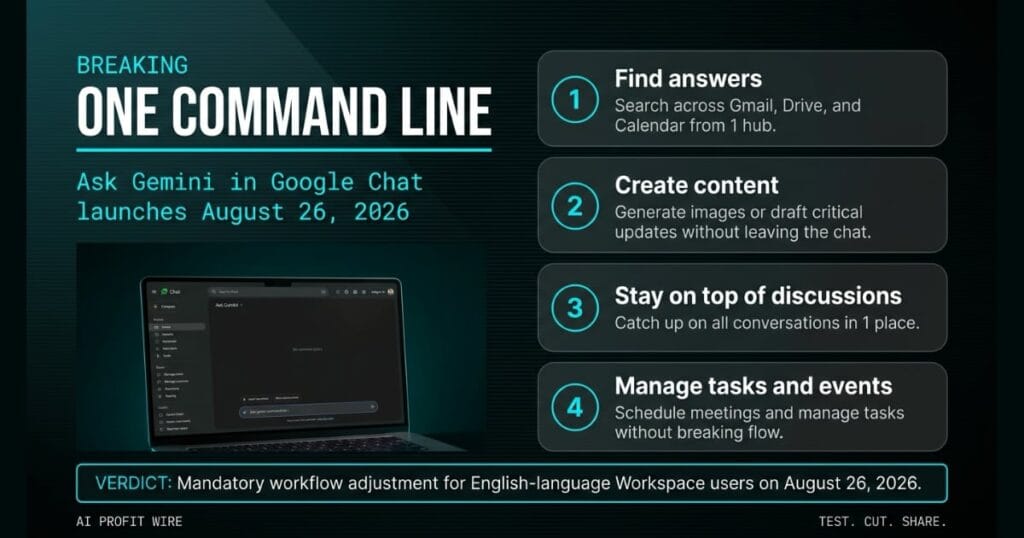
Ask Gemini in Google Chat is a unified command line for Workspace Intelligence that launches August 26, 2026. It integrates Gemini AI directly into the chat interface to automate tasks across Gmail, Drive, and Calendar.
The tool allows users to search Workspace data, generate images, draft critical updates, and manage tasks and events without leaving the conversation. The chat app becomes the central hub for real-time collaboration and data retrieval.
The August 26, 2026 launch also retires the Gemini side panel in Chat. Gems remain available in the side panel of other Workspace apps, but conversation history from the Chat side panel does not migrate to the new Ask Gemini surface.
Google Chat becomes a unified command line for Workspace Intelligence on August 26, 2026.
What is the evidence behind Ask Gemini in Google Chat?
The rollout begins August 26, 2026 with a gradual release of up to 15 days for feature visibility. The system uses Workspace Intelligence to navigate data across Gmail, Drive, and Calendar, with the ability to gather information and take action.
Ask Gemini helps users find answers quickly by searching across Workspace data. It also generates images, drafts critical updates, and lets users catch up on conversations in 1 place.
Admins can export Gemini conversation history, including the old Chat side panel history, and end users may download their own history if permitted by their organization. The data is stored under “Gemini in Workspace,” not “Google Chat,” in the Data Export tool and Google Takeout.
The evidence is the official Google Workspace updates blog and the unified command line it documents.
How does Ask Gemini in Google Chat compare to the alternatives, and what background do small business owners need?
Ask Gemini merges administrative actions into 1 command line. It uses the user’s own Workspace data to provide context-specific answers without manual search across 3 separate apps.
The feature is available by default if Gemini in Workspace in Chat and Workspace Intelligence for all apps are enabled. End users must be enrolled in Workspace Smart Features to use it.
The new Ask Gemini surface is available in the Shortcuts menu in Chat or via the keyboard shortcut Ctrl+g on ChromeOS and Windows, or Command+g on macOS.
Ask Gemini consolidates Gmail, Drive, and Calendar search into 1 hub for English-language Workspace users.
The bookkeeper pulls up 3 browser tabs before every client meeting: Gmail for the latest invoice thread, Drive for the signed contract, and Calendar for the next sync date. The handoff happens every time, multiplied by every client meeting on the calendar.
The August 26, 2026 update kills that handoff loop for Google Workspace users. Instead of navigating 3 separate apps to find a file or schedule a meeting, you type 1 command into the Chat sidebar and Ask Gemini returns the answer.
The bookkeeper closes 2 of those 3 tabs and runs the whole client meeting out of the chat window. The 3-app handoff collapses into 1 command line, which is the structural shift Google is betting on for productivity.
How does Ask Gemini in Google Chat affect day-to-day operations for small businesses?
Small business owners reduce the time spent hunting for documents, drafting updates, and managing calendar events, mirroring the efficiency found in other recent productivity signals tracked across the Wire. The friction of switching between Gmail, Drive, and Calendar drops to 1 chat surface.
Through October 1, 2026, Workspace customers get promotional access to higher limits for Ask Gemini in Chat. Usage limits will apply after that date, with more information to be shared in the Help Center.
The feature rolls out to Business Standard and Plus, Enterprise Standard and Plus, and Google AI Pro for Education editions. English-language accounts are the first to receive it, with more languages to follow.
Day-to-day operations shift from app-switching to a single command line inside Google Chat.
What is the final verdict on Ask Gemini in Google Chat?
Ask Gemini in Google Chat provides a direct time-save by allowing users to search Gmail, Drive, and Calendar in 1 place. It also generates images and drafts critical updates without leaving the conversation.
Founders already paying for Google Workspace Business Standard or Plus get this capability at no additional cost during the promotional window. The feature requires admin enablement of Gemini in Workspace in Chat and Workspace Intelligence for all apps.
The retirement of the Gemini side panel in Chat is the tradeoff. Conversation history doesn’t migrate, so teams should export their data through the Data Export tool or Google Takeout before the rollout completes.
Ask Gemini is a mandatory workflow adjustment for English-language Workspace users on August 26, 2026.
Source: workspaceupdates.googleblog.com
