Saves time searching through crowded email threads for specific information.
What is Gmail AI Overviews and what does it do?
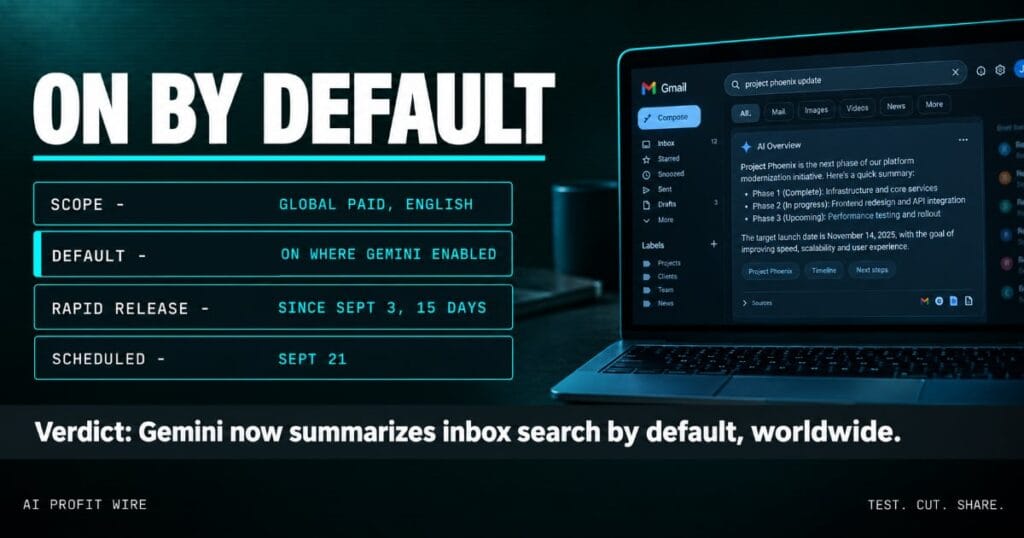
Gmail AI Overviews answers natural language questions inside the Gmail search bar, summarizing what it finds across your mail instead of returning a list of threads. Google opened the feature to global users on paid plans with English language settings, after it reached only US users before.
The Workspace update frames it as asking questions and getting concise answers without digging through emails, which replaces the manual hunt through long threads.
The expansion covers Business and Enterprise editions, and consumer Google AI Plus, Pro, and Ultra plans outside the EEA, UK, Switzerland, and Japan.
The mechanics matter for the privacy question. Google’s help page describes the sequence in plain terms: Gmail first finds the most relevant emails, then an AI Overview is generated using the information from those emails, which means the feature reads before it answers.
Gmail search now returns answers, and it reads your mail to build them.
Is Gmail AI Overviews on by default?
Yes, wherever Gemini for Workspace in Gmail and Workspace Intelligence access to Gmail are enabled, the feature turns on by default, per Google’s admin documentation.
End users see it when both “Smart features in Gmail, Chat, and Meet” and “Google Workspace smart features” are turned on, which most accounts never changed from their defaults.
Rapid Release domains started a gradual rollout on September 3 that takes up to 15 days for full visibility, and Scheduled Release domains follow on September 21.
The rollout wave also splits by account type. Paid Workspace domains in every region are in scope, while consumer accounts in the EEA, UK, Switzerland, and Japan stay outside this expansion, so a mixed personal-and-work team can see the feature on one inbox and not the other.
You have until your domain’s rollout date to set the default on purpose.
How is this different from the Gemini summaries already in Gmail?
The Gemini-era update that landed in January put automatic summaries at the top of threads and AI assistance inside compose, alongside Help Me Write, suggested replies, and proofreading.
Thread summaries answered the reading problem, and Inbox-level AI Overviews answer the finding problem, which is the harder one when the answer spans a dozen threads across a year of mail.
AI Overviews sit on the retrieval side. Per Google’s help page, Gmail first finds the most relevant emails, then generates an answer from the information in them.
One summarizes the thread you already opened, and the other answers questions across threads you never opened.
Thread summaries save reading time, and search overviews save finding time.
Who does Gmail AI Overviews affect?
Every paid Workspace domain with English-language users carries the feature, and admins inherit the decision unless they set it first.
Teams in legal, healthcare, and finance carry the sharper question, because a model that reads archived mail to answer questions touches records those industries regulate.
The Admin console exposes the controls service by service, and a companion documentation page covers the Workspace Intelligence access that AI Overviews also requires, so a staged rollout by team is a configuration choice rather than a project.
The inbox is turning into an AI input layer one release at a time, and we cover each wave in the signals archive.
If your compliance policy names email, this rollout belongs in this quarter’s review.
A paralegal types “what did the client send about the deposition date” into Gmail on a Tuesday and gets a clean answer built from a year of email. The deposition is real, the date in the answer is right, and nobody in the firm remembers turning anything on.
That is the 15-day gradual rollout at work. The feature arrived with September 3’s Rapid Release wave, and by the time anyone reads about it, each English-language mailbox in the firm answers questions on demand.
The audit question is older than the feature: who approved a model reading the mail, and where is that approval written down?
How do you turn off AI Overviews in Gmail?
Admins control the feature through the Admin console by managing Gemini for Workspace in Gmail and Workspace Intelligence access to Gmail, at the domain, organizational unit, or group level.
The user-side toggle lives in Gmail’s smart features settings, and turning those off carries collateral: the same switches govern smart compose and the other assistive features your team already uses, which is worth knowing before anyone flips them in protest.
Scheduled Release domains still have days before the September 21 window, which makes this week the last quiet moment to set a written default.
For teams that want the feature without the surprise, the same console holds the middle path: enable it for a pilot group first, then widen the circle once the questions people type stop surprising you.
Decide the default now, because the rollout date otherwise decides it for you.
Source: Google Workspace Updates
