Helps small business owners choose the right video tool to cut down content creation time without wasting money on the wrong category.
The best AI tools for TikTok and Reels split into 3 categories: repurposing tools that cut long videos into short clips, text-to-video generators that build clips from a script, and avatar platforms that put a synthetic talking head on screen. Which category earns your budget depends on one thing, and it is not the feature list.
It is whether you already have footage. A 3-week roundup from the AutoGPT blog tested 7 tools on identical inputs, a 45-minute podcast, a 300-word blog post, and a product demo script, and the gap between the best and worst output was enormous.
What Are the Best AI Tools for TikTok and Reels?
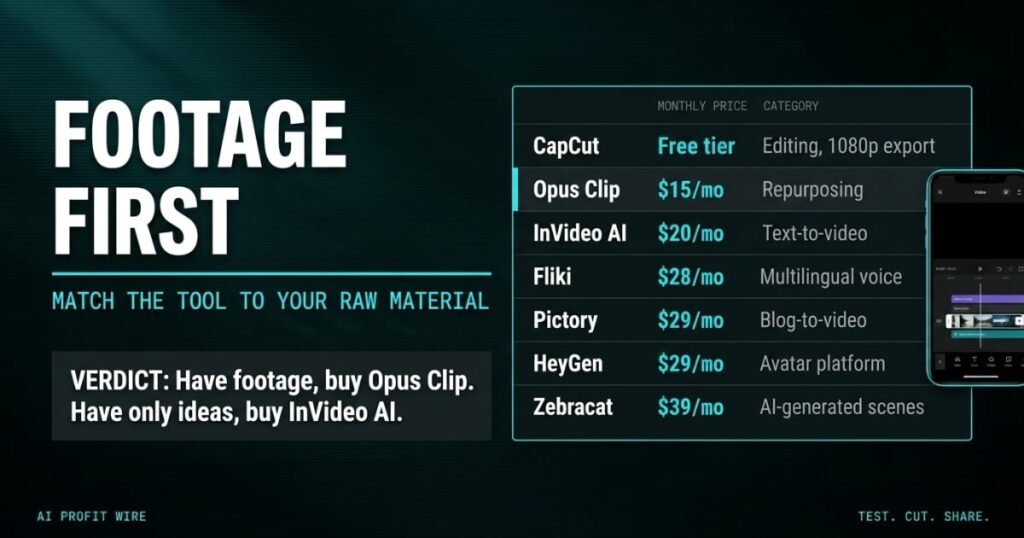
The field breaks into camps you can hold in your head. Opus Clip repurposes long-form video, InVideo AI and Fliki generate video from text, HeyGen and Pictory cover avatars and blog-to-video, CapCut is the free editor, and Zebracat generates AI scenes from scratch.
Entry pricing on the vendors’ own pages runs from CapCut’s free tier to Zebracat’s $39 a month, with Opus Clip’s Starter plan at $15 a month and InVideo AI’s Starter plan at $20 a month, or $10 on annual billing.
The market behind them is real. The roundup cites projections of $14.8 billion by 2030 and a survey of 16,000 creators in which 86% already use generative AI somewhere in their workflow and 63% use it for scriptwriting.
The category decision comes before the tool decision, and your raw material makes the category call.
Do AI Video Tools for TikTok Actually Work?
On repurposing, yes, with receipts. Opus Clip turned the 45-minute podcast into 12 clips and scored each one for virality, and the 3 clips scoring above 85 were the strongest segments while the ones under 60 had awkward cuts or started mid-sentence.
On generation, InVideo AI assembled a 60-second video from a text prompt in 2 to 4 minutes, and its Continuity Engine holds color grade and pacing across stock footage scenes.
The free tiers are where the fine print lives. Opus Clip’s free plan watermarks everything, caps at 60 credits a month, and expires clips after 3 days, which makes it a demo rather than a working plan.
The tools work inside their category, and since about 80% of TikTok and Reels viewing happens without sound, the caption engine matters as much as the cut.
Opus Clip vs InVideo AI: Which Is Better for a Small Business?
If you have long-form video, Opus Clip wins on cost per output. It accepts uploads up to 3 hours, cuts vertical clips with captions in 20+ languages, and posts direct to TikTok, YouTube Shorts, and Instagram from $15 a month.
If you have nothing but a script, InVideo AI is the value pick. It writes the script, pulls iStock footage, adds voiceover, and lets you swap clips without regenerating the whole video, from $10 a month on annual billing.
HeyGen at $29 a month is the talking-head option, with lip sync tighter than its early 2025 output and a dubbing feature that re-lipsyncs into other languages, although TikTok audiences spot synthetic faces fast. Fliki, from $21 a month on annual billing, is the multilingual voice play with 2,000 voices across 80+ languages.
Have footage, buy the clipper. Have only ideas, buy the generator. Paying for the wrong one is the expensive way to learn the difference.
Who Are AI Video Tools Actually For?
Repurposing tools suit teams that already produce long-form material: podcasts, webinars, demos, interviews. Generators suit faceless accounts in finance, how-to, and news niches where stock footage plus a voiceover reads native.
Avatars suit educational and professional content, product demos, internal training, and multilingual delivery, and they fail on trend-driven posts where authenticity is the product.
If your team sits on hours of recorded material, the repurposing math is the cheapest place to begin.
Match the tool to your raw material, because the wrong category bleeds budget with every renewal.
The renewal email lands on the 1st of the month with 4 video subscriptions on it, and the one doing real work is the $15 clipper. The $29 avatar seat has shipped 3 explainers since spring, and the $39 scene generator has one demo reel to its name.
That is the pattern the test quantifies: paying for generation when the raw material was already recorded and sitting in a folder. It is the quietest way a video budget leaks, and it compounds monthly.
Audit the card the same way. Tag each subscription by the raw material it touches, cancel the ones pointing at footage you do not own, and put the savings against the archive you already paid to produce.
Is Opus Clip Worth $15 a Month?
If you publish from long-form video, yes, and the payback is fast. One 45-minute podcast producing 12 candidate clips pays the month’s subscription on a single upload, and the virality scoring does the triage a junior editor would.
If you do not have source video, no. Opus Clip requires footage and generates nothing from scratch, so the same $15 buys nothing without raw material.
The full breakdown of plan tiers and what each one costs against real output is laid out in our Opus Clip intelligence report.
The efficient stack the testing landed on pairs Opus Clip for repurposing, CapCut’s free tier for edits, and InVideo AI or Fliki for generation, and the whole set runs under $45 a month.
At $15 a month, Opus Clip is the cheapest seat at the table for any team that already records long-form, and a wasted $15 for any team that does not.
Source: AutoGPT Blog
